AMPscript Academy AMPscript Academy Join free
The AMPscript Lab

Practice real AMPscript without an SFMC login.

Build your own data extensions, write the logic, preview it against real records, then publish what you built as proof you can do it. Free, in your browser.

Join free and get your access code Watch the tutorial
No SFMC account needed Runs entirely in your browser Publish what you build
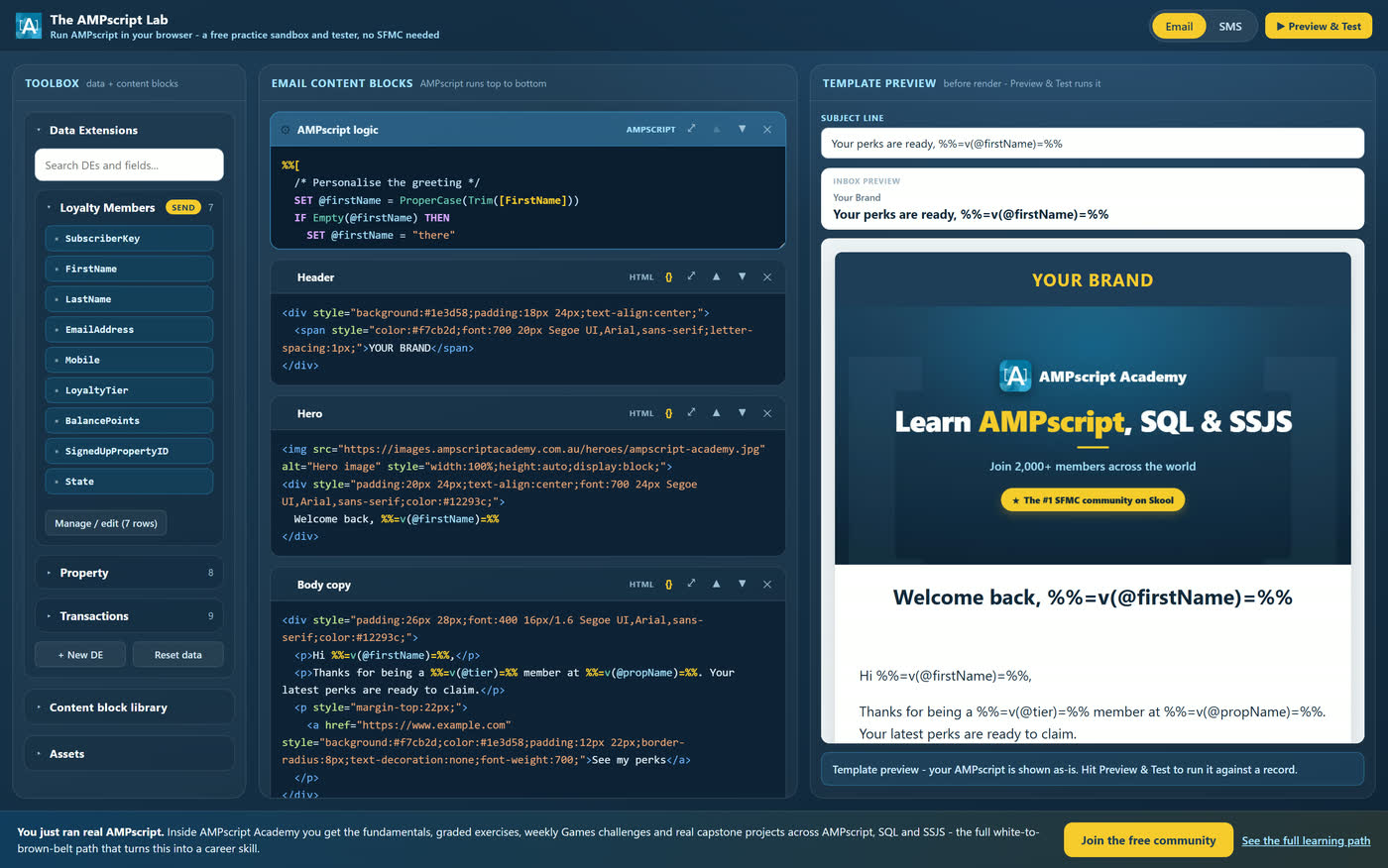
The AMPscript Lab interface showing the toolbox with data extensions, the email content blocks editor with AMPscript, and the live template preview.

Built by AMPscript Academy. Used inside a community of 2,100+ Marketing Cloud professionals.

The real blocker

You cannot get good at AMPscript by reading about it.

Everyone tells you to practise. Nobody tells you where. You are not going to experiment inside a live client account, and a personal SFMC org is not something you can just sign up for. So the practice never happens.

“I just copy and paste it.”

It works, you ship it, and you still could not explain why it works if someone asked.

“I have nowhere to practise.”

No sandbox, no personal org, and testing on a client account is not an option.

“I freeze in technical interviews.”

You can talk about campaigns all day, then the AMPscript question lands and you stall.

“I have nothing to show.”

No projects, no portfolio, no evidence. Just a CV that says you were involved.

The Lab fixes the first three. Keep reading for the fourth, because that is the one nobody solves for you.

What it is

A real AMPscript environment that opens in a browser tab.

Mock data extensions with real records. A code editor with proper syntax highlighting. Content blocks you drag in. An SFMC-style Preview and Test that renders your email or SMS against any subscriber. It behaves like the thing you are training for, without the account, the approvals or the risk.

A walkthrough of the Lab, from an empty editor to a personalised email.

Inside the Lab

Everything you need to actually practise.

01

Build your own data extensions

Rename them, add and remove fields, edit the records inline, add rows, and set which one is the send DE. The seed data is deliberately messy, with lowercase names, blank values and stray spaces, so you get real practice with Trim, ProperCase and Empty.

The Manage Data Extension screen showing editable fields and a records grid for the Loyalty Members data extension.
02

Write real AMPscript, not a toy subset

Variables and SET, IF and ELSEIF, string and date functions, Lookup, LookupRows, LookupOrderedRows, RowCount and FOR loops. Full syntax highlighting, and errors that tell you what went wrong in plain English instead of a stack trace.

The AMPscript editor with a LookupRows and RowCount example, syntax highlighted.
03

Drag in blocks and build the email

Headers, heroes, image and article, two column, bullet lists, buttons, or paste your own HTML. Stack them in any order, reorder them, and hit Format to tidy up messy markup. This is where loops stop being abstract, because you can see the rows rendering.

The content block library open in the toolbox, showing available email blocks.
04

Use the built-in images, or bring your own

There is an asset library of heroes, event images and loyalty tier banners ready to go. You can also drop in the URL of any image from anywhere on the web and build whatever template you like. Either way, paste it straight into an img tag or set it as a variable and print it. The tier banners are there so you can practise a conditional hero that changes per subscriber.

The assets library showing hero images, event images and loyalty tier banners with copyable URLs.
05

Preview and Test against real records

The same pattern you use in Marketing Cloud. Pick a subscriber, see the record you are previewing against on the left and the rendered email on the right, then step through the records one by one and watch the same code produce a different message every time. That moment is when AMPscript finally clicks.

The Preview and Test modal showing the record inspector beside a rendered personalised email.
06

Email and SMS, both

Flip the channel and the same personalisation logic renders into a phone mock instead of an inbox. Character-tight SMS copy is its own skill, and most people never get to practise it before they are asked to build one.

The Lab in SMS mode showing a personalised message rendered in a phone preview.
Proof, not just practice

Everything above teaches you. This part gives you something to show.

Finish a build and the Lab generates a branded card: the AMPscript you wrote on one side, the rendered result on the other, previewed against a real record. Your name on it.

The Share your build panel, showing the LinkedIn and Skool community options beside a preview of the build card with AMPscript on the left and the rendered email on the right.

Post it on LinkedIn

The caption is written for you, professional and ready to edit. Recruiters and hiring managers see the work, not a claim about it.

Share it in the community

A warmer version for the Skool feed, where people will actually tell you what they would have done differently.

Put it in your portfolio

Download the image and attach it to your CV, your portfolio site, or the folder you open in an interview.

In an interview, you stop describing what you would do.

You put code on the screen that you wrote, explain why you used a Lookup there and a loop here, and show the output it produced. That is a completely different conversation, and it is the answer to having nothing to show.

Start building something to show

After a few sessions

What changes.

You can read a block of AMPscript someone else wrote and say what it does, out loud, without hedging.

You stop pasting code you do not understand, because you have already broken it and fixed it yourself.

A dynamic content request stops being something you escalate to the dev team.

You walk into a technical interview with something you built on screen, and you can explain every line of it.

How to get in

Three steps, about two minutes.

The Lab is in early access with the first cohort, so it opens with a code. Here is exactly how you get one.

1

Join the free AMPscript Academy community

Free forever, no card. It is a Skool community of 2,100+ Marketing Cloud professionals.

2

Grab your access code

It is waiting for you inside as soon as you join. You will not have to ask anyone for it.

3

Open the Lab and build something

Enter the code once and your browser remembers it. Then write your first line of AMPscript.

Join free and get your access code

Questions

Before you join

Is The AMPscript Lab free?
Yes. The Lab is completely free. You join the free AMPscript Academy community on Skool and your access code is waiting for you inside. There is no card and no trial period.
Do I need a Salesforce Marketing Cloud account to use it?
No. That is the whole point of the Lab. It runs entirely in your browser with its own mock data extensions and records, so you can practise AMPscript without an SFMC login and without touching a client account.
Why do I need an access code?
The Lab is in early access with the first cohort while it is being finished. Joining the free community gets you the code straight away, and it means the feedback shaping the tool comes from people who are actually learning AMPscript.
Does my access expire?
No. It is not a trial. Once you are in the free community you keep access, and every new feature that ships lands in the same tool.
What can I actually build in it?
Personalised emails and SMS. You can create your own data extensions and records, write AMPscript with SET, IF and ELSEIF, string functions, Lookup, LookupRows, LookupOrderedRows, RowCount and FOR loops, drag in content blocks, use the built-in sample images, then preview the result against any record.
Do I need to know how to code already?
No. The Lab was built for marketers who have never written code. You start by changing one line and seeing what happens, which is a very different experience from reading documentation and hoping it sticks.
Can I use what I build in my portfolio or in job interviews?
Yes, and you are encouraged to. When you finish a build the Lab generates a branded card showing the AMPscript you wrote next to the rendered result. Download it, post it on LinkedIn, share it in the community, or put it in your portfolio. In an interview it means you can walk someone through code you actually wrote instead of describing what you would do.

Stop reading about AMPscript. Go and write some.

Join the free community, grab your code, and have something built before the end of the day.

Join free and get your access code

Free forever. No card required.